Merge QualCoder Projects
Go to the Help menu and select Special Functions:
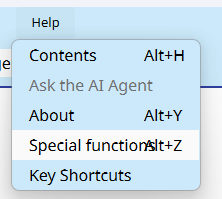
Select a QualCoder project to merge (the source project) into the currently opened project, the destination project.

Then click the Run merge projects, button. 
Before performing the merge, make a backup of the destination project.
Caution: If each project to be merged has the same coder name, e.g., 'default', then these will merge as such, and you will not be able to separate out which coder performed their own coding. This may or may not be an important consideration to your final merged project.
The following occurs:
- Copies unmatched files from source project folders to destination project folders.
- Adds new (unmatched) source categories to destination database.
- Adds new (unmatched) source code names to destination database.
- Adds journals and stored_sql to destination database, only if they have names that do not match existing destination names.
- Adds text codings, text annotations, image codings, A/V codings to destination database.
- Adds cases and case_text (links from cases to text file segments and images and A/V).
- Add attributes for files and cases.
- Adds attribute values. Existing destination attribute values are not over-written, unless they are blank.
Considerations before merging
Ideally, everyone would have the same identical files within the project. Ideally, using the same set of code names - but this could be worked around later if merging or renaming codes occurred in the collated project. Coder names - would need to be unique for each coder. So, when collating the individual coders' work can be identified. Alternatively, coder names could be the same, provided each coder worked on unique files. But that all depends on your end goals, really. If you had a need to collate all under one coder name.
Warnings when merging
The main warning is if the source project and destination project contain the same text file. If the source project text file has been edited, and may be longer or shorter, then the imported text coding positions and annotations will be incorrect. This is because the original destination project text file text stored in the database is not replaced with the edited text file from the source project.