Journals
You can record your thoughts when coding your data in journals. Use these to develop ideas and themes. Journals can be exported as a single journal, or all journal text can be collated and exported as a single file. Journals can be deleted. Journals can have attributes.
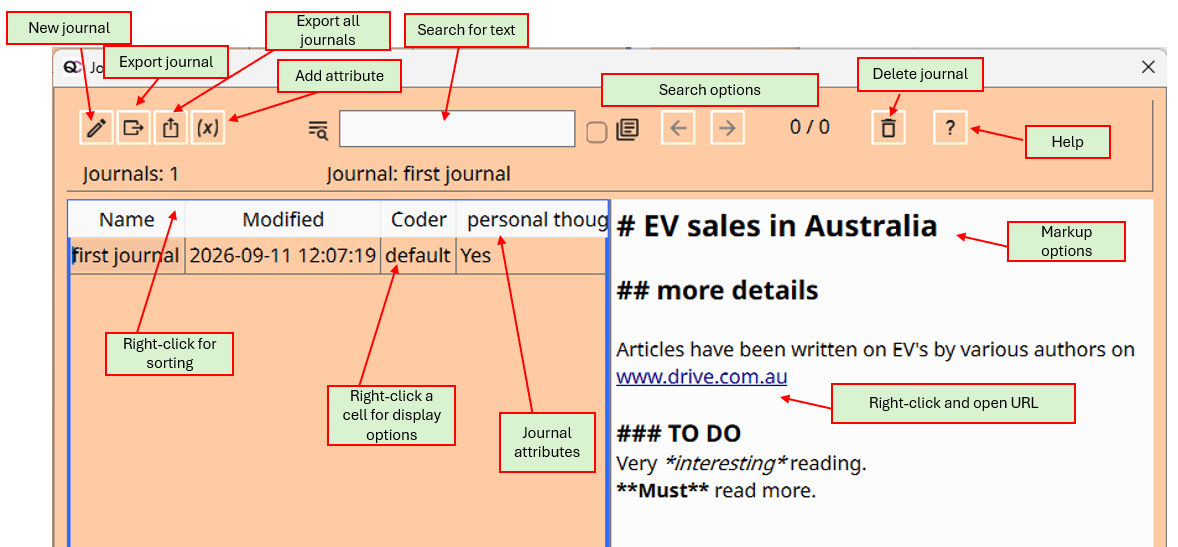
There is a search option for searching the journal text. The search uses regular expression (regex) symbols for greater flexibility.
- A dot '.' is used as a wild card, e.g., '.ears' will match ‘bears’ and 'years'
- A '?' after a character will match one or none times that character, e.g., 'bears?' will match 'bear' and 'bears'
- A '*' after a character will match zero or more times.
- '.' will match the dot symbol, '\?' will match the question mark. '\n' will match the line ending symbol.
Tip
You can sort journals by name or date. You can add attributes to journals. You can show rows of journals with a matching text name, coder or attribute value, using the right-click menu function.
The journal window will be free-floating, so that you can enter notes while coding or generating reports.
Highlight journal text using markdown
Some markdown is available to highlight wording in a journal. Use one to three hash symbols for heading levels. Single asterisk surrounding words for italic text. Double asterix surround text for bold text.
URLs are identfied and can be opened with right click menu.