Imports and exports
Project Menu contains most imports and exports.
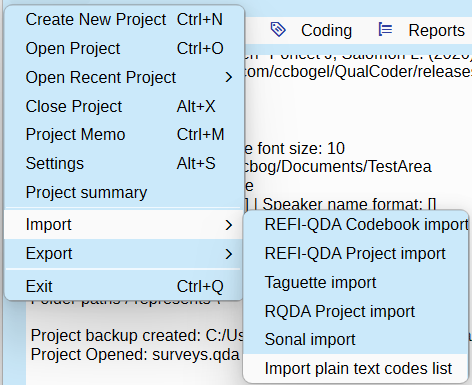
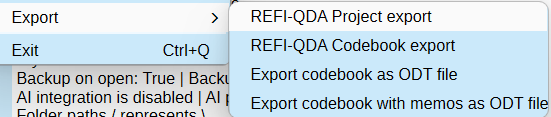
Projects and codebooks can be exported using the REFI-QDA standard. Codebooks can be exported to ODT or plain text.
Surveys are imported via a button in the Manage Files window. See Survey Imports
Codebook export
This is an option under the Project Menu > Exports.
A codebook is a list of your codes. Each code memo should detail the reasons for the purpose of each code. The codebook can be exported to a text file. The codebook also shows the frequency of the codes used (from all coders). As codes and categories are put in a tree like structure the double minus ‘–‘ indicates the subordinate codes and categories within a category.
Codebook import
Import a codebook as a plain text (.txt) file or as a .csv file. Use two greater than symbols to separate category and code. Use three greater than symbols to define a code under a code.
Codebook - Plain text import
Create a plain text (.txt) file. Use the tab to then add a memo.
Codebook - CSV file
Create a CSV file in LibreOffice Calc or MicrosoftOffice Excel. The categories and codes are in the first column, and set up in the same way as for a plain text file. Any code memos are in the second column.
REFI-QDA
Rotterdam Exchange Format Initiative (REFI) is an open standard for exporting and importing codebooks and projects from and to different computer-aided qualitative data analysis software.
Currently, QualCoder is able to import a codebook provided it is using the "urn:QDA-XML:codebook:1.0" version. QualCoder exports in this version also.
Exportation of a project and importation of a project are functional. We do not guarantee Qualcoder meets the full REFI-QDA standard. Some experimentation has been performed with Nvivo, Atlas.ti, Quirkos and MAXQDA REFI_QDA project files. Importation into MAXQDA seems to require an additional line ending character regarding text coding - this is an option in the REFI-QDA project export from QualCoder. Import into Atlas.ti shifted codings by a character after each line ending, and has not yet been resolved. Importation of attributes from QualCoder does not work for Atlas.ti, MAXQDA, case attributes were not imported into Quirkos.
Features such as sets and graphs cannot be imported as this functionality is not within QualCoder. Other data formats are not preserved, for example date or boolean would be converted to text data.
For audio and video, importation of transcriptions and syncpoints is untested. Importation/linking of relative linked files has not been tested.
To import, close any currently opened project first. Then choose a new QualCoder project name, then select the qdpx import file.
If no coded data is visible, you may need to change the current coder's name in Settings. Try the drop-down coder name box.
This is now old (Feb 2021), but a user tested the importation of a REFI-QDA project file generated by QualCoder and imported into MAXQDA, Quirkos, Atlas.ti. Only text and Images were tested. A PDF of the test results is here: Testing importation of REFI-QDA Project files into Atlas, MAXQDA, Quirkos PDF
Taguette import
Projects created with Taguette can be imported from the sqlite file. All your core coding data will be transferred.
Close any open project. Then, in the Main Menu under Project, click on Taguette Project import. You will be asked to create a new project, so enter a name. Then, you will be prompted to select the Taguette project file (usually with a .sqlite3 extension). QualCoder will then proceed to import the data.
If you do not see any coded data, you may need to change the current coder's name in the Settings. Try using the coder name drop-down box.
Sonal π (Sonal Pi) import
Projects created with Sonal Pi a French developed qualitative Data Analysis Software can be imported.
RQDA import
Projects made with RQDA can be directly imported. All data except for file categories are imported.
Close any opened project. Then in the Main Menu under Project click on RQDA Project import. You will be asked to create a new project- so enter a name. Then you will be asked to select the RQDA project file. QualCoder will then import the data.
If no coded data is visible, you may need to change the current coder's name in Settings. Try the drop down coder name box.
Survey import
See page Survey Imports
Bibliography import
See page Managing Data - References
Help - Special Functions
Dynamic update text content
This is useful for updating text files, such as blog post extracts, that change over time. Update a text file while attempting to keep the existing coded text segments. Select the text file that needs to be replaced and select the replacement file. Click the cogs button to run the update. This function works by finding the identical matching text in the replacement file as it parses through the file text. It may produce erroneously coded segments.
Merge Projects
See page: Merge QualCoder projects